git_logoWhen contributing to open source projects, it’s pretty common these days to fork the project on Github, add your contribution, and then send your work as a so-called “pull request” to the project for inclusion. It’s nice, clean and fast. I did this last week to contribute to Apache CloudStack. When I wanted to contribute again today, I had to figure out how to get my “forked” repo up-to-date before I could send a new contribution.

Remember, you can read/write to your fork but only-read from the upstream repository.

Adding upstream as a remote
When you clone your forked repo to a local development machine, you get it setup like this:

git remote -v
origin [email protected]:remibergsma/cloudstack.git (fetch)
origin [email protected]:remibergsma/cloudstack.git (push)

As this refers to the “static” forked version, no new commits come in. For that to happen, we need to add the original repo as an extra “remote” that we’ll call “upstream”:

git remote add upstream https://github.com/apache/cloudstack

Now, run the same command again and you’ll see two:

git remote -v
origin [email protected]:remibergsma/cloudstack.git (fetch)
origin [email protected]:remibergsma/cloudstack.git (push)
upstream https://github.com/apache/cloudstack (fetch)
upstream https://github.com/apache/cloudstack (push)

The cloned git repo is now configured to both the forked and the upstream repo.

Let’s fetch the updates from upstream:

git fetch upstream

Sample output:

remote: Counting objects: 151, done.
remote: Compressing objects: 100% (123/123), done.
remote: Total 151 (delta 39), reused 0 (delta 0)
Receiving objects: 100% (151/151), 153.30 KiB | 0 bytes/s, done.
Resolving deltas: 100% (39/39), done.
From https://github.com/apache/cloudstack
   2f2ff4b..49cf2ac  4.4        -> upstream/4.4
   aca0f79..66b7738  4.5        -> upstream/4.5
* [new branch]      hotfix/4.4/CLOUDSTACK-8073 -> upstream/hotfix/4.4/CLOUDSTACK-8073
   85bb685..356793d  master     -> upstream/master
   b963bb1..36c0c38  volume-upload -> upstream/volume-upload

We now got the new updates in. Before you continue, be sure to be on the master branch:

git checkout master

Then we will rebase the new changes to our own master branch:

git rebase upstream/master

You can achieve the same by merging, but rebasing is usually cleaner and doesn’t add the extra merge commit.

Sample output:

Updating 4e1527e..356793d
Fast-forward
SSHKeyPairResponse.java                       | 12 ++++++++++++
SolidFireSharedPrimaryDataStoreLifeCycle.java | 33 +++++++++++++++++++++++++++++++++
RulesManagerImpl.java                         |  2 +-
ManagementServerImpl.java                     |  5 +----
4 files changed, 47 insertions(+), 5 deletions(-)

Finally, update your fork at Github with the new commits:

git push origin master

Branches other than master
Imagine you want to track another branch and sync that as well.

git checkout -b 4.5 origin/4.5

This will setup a local branch called ‘4.5’ that is linked to ‘origin/4.5’.

If you want to get them in sync again later on, the workflow is similar to above:

git checkout 4.5
git fetch upstream
git rebase upstream/4.5
git push origin 4.5

Automating this process
I wrote this script to synchronise my clones with upstream:


#!/bin/bash

# Sync upstream repo with fork repo
# Requires upstream repo to be defined

# Check if local repo is specified and exists
if [ -z $1 ]; then
 echo "Please specify repo to sync: $0 <dir>"
 exit 1
fi
if [ ! -d $1 ]; then
 echo "Dir $1 does not exist!"
 exit 1
fi

# Go into git repo and update
cd $1

# Check upstream
git remote -v | grep upstream >/dev/null 2>&1
RES=$?

if [ $RES -gt 0 ]; then
 echo "Upstream repo not defined. Please add it:
 git remote add http://github.com/..."
 exit 1
fi

# Update and push
git fetch upstream
git rebase upstream/master
git push origin master

Execute like this:

./update_origin_with_upstream.sh /path/to/git/repo


Happy contributing!

Be the automator!

30 November 2014 — Leave a comment

Today I saw an awesome video of a presentation by Glenn O’Donnell.

In his presentation, Glenn states that it’s not about technology, it’s about services. Service design is modular with a logical structure. Approach it as a system and try to improve it as a whole, not just tiny pieces of it. To do that, you need systems engineers. Although most are lazy, or, as Glenn puts it: “Locally brilliant, globally stupid”.

Accept we have no full control
The whole eco system includes a lot of infrastructure and application components. Including services from third parties. We tend to zoom in a lot but then we miss the point: it’s not about the servers, the storage and the network. It’s about how it all works together. And let’s face it, we’ll not have full control over the eco system because it contains components managed by third parties.

We IT people have a hard time accepting we have no control. We think we’re the only one that can maintain that server. But in fact, software can do better and will put us out of business. That software is already out there today.

In this new world, we need people with a different skill set that can manage this complex eco system. It’s all software these days. Obviously the application is software, but so is the infrastructure on which it runs. Cloud infrastructure is all software defined. Even physical servers should be software controlled, instead of manipulating them manually.

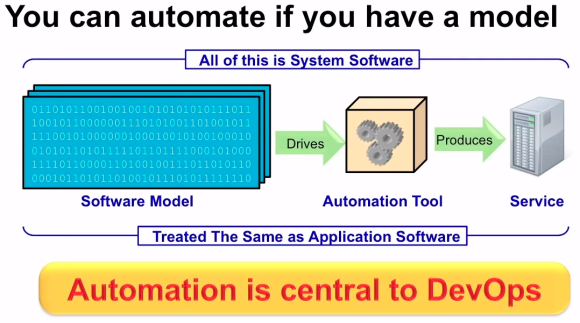
How? Well, you can automate if you have a model. The model is a software description of reality. Tools consume this model and create reality out of it.

 ne the automator model

Software Model drives Automation Tool that produces the Service.

Glenn compares this with building a plane: first models are build and simulated before they ever put a plane in the air. Makes sense, right?

We should not be on the command line
This means we should not be on the command line. Let’s get away from the command line! We should manipulate the model instead, and let the model create or change reality. This model is our system software, which we should treat the same way as we treat application software. It’s software, and we can automate software.  By the way, no automation means no DevOps because it’s gonna be too slow.

You’ll also get a better quality because human beings are bad at repetitive tasks. And it’s a waste having smart people do repetitive work. Software can do that instead. The model is the language, the secret code.

Automate yourself out of your job
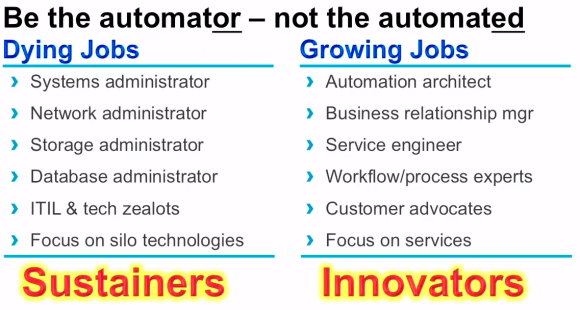
Although this is cool, it does render some jobs obsolete. Glenn states that if you have “administrator” in jour job title, you’ll be replaced by software (that can do better). But don’t worry, there will be other, more interesting jobs, instead. Automate yourself out of your job. It’s fun! In short: be the automator, not the automated.

be the automator jobs

To drive this movement, we need innovators! Geeks are innovators 🙂 Geeks love change, they automate, they create, and they want to move on to the next interesting thing to discover.

Next to Geeks, there are also Geek Imposters. They might do the same job, but they hate change and want to keep everything as it is. To them, Glenn has a nice advice: “Learn to say: Would you like fries with that?“.

View the video of Glenn’s presentation:

Geeks are changing the world. If you think you are a Geek that loves change and loves automation, you could be what we call a Cupfighter at Schuberg Philis.

Are you a Cupfighter?

If you think you are a Cupfighter, please contact me and we’ll change the world 😉

CloudMonkey is an easy way to interact with the CloudStack API without the need to do any code writing. Think of it like a way to “query” the CloudStack infrastructure. Very useful in day-to-day operations to get a “quick look” at things.

Version 5.3 is on its way, and recently I had a look at it. I used my MacBook Pro for this, and it came with some challenges to get it working. So, I’m writing down here how to get CloudMonkey 5.3 working on either MacOSX Mavericks (10.9) or the new Yosemite (10.10).

Installing CloudMonkey from source
Since I wanted to look at the latest (not yet released) version I used the source from git. If you want to use the latest stable version, please skip to the next section where I discuss installing using PIP.

Let’s install from source:

git clone https://github.com/apache/cloudstack-cloudmonkey.git

Something like this should happen:

Cloning into 'cloudstack-cloudmonkey'...
remote: Counting objects: 782, done.
remote: Total 782 (delta 0), reused 0 (delta 0)
Receiving objects: 100% (782/782), 236.67 KiB | 359.00 KiB/s, done.
Resolving deltas: 100% (427/427), done.
Checking connectivity... done.

If it doesn’t work, you might need to install Git or install the Command Line Developer tools. Just follow the on-screen instructions and you’ll be fine.

Next, compile the source:

make build

It’ll give some output, and as long as it doesn’t error out you’re fine. Then install using sudo:

sudo make install

CloudMonkey has now been installed to /usr/local/bin.

Installing CloudMonkey from PIP
Alternatively, you can use PIP to install. PIP is a tool to easy install Python software and there’s a PIP for CloudMonkey as well. At the time of writing, there is a 5.2 version that you can install.

First install to the latest version of PIP:

sudo easy_install --upgrade pip

If CloudMonkey is already installed, uninstall it first (your config is saved):

sudo pip uninstall cloudmonkey

Then install it again:

sudo pip install cloudmonkey

Running CloudMonkey

To run it, just type:

cloudmonkey

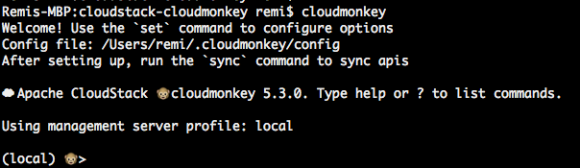
 CloudMonkey should then welcome you:

When you see this, CloudMonkey is installed successfully.

When you see this, CloudMonkey is installed successfully.

On Mac OSX Yosemite this worked out-of-the box, although on Mavericks it did not:

Remis-MBP:git remi$ cloudmonkey 
Traceback (most recent call last):
  File "/usr/local/bin/cloudmonkey", line 5, in <module>
    from pkg_resources import load_entry_point
  File "/System/Library/Frameworks/Python.framework/Versions/2.7/Extras/lib/python/pkg_resources.py", line 2603, in <module>
    working_set.require(__requires__)
  File "/System/Library/Frameworks/Python.framework/Versions/2.7/Extras/lib/python/pkg_resources.py", line 666, in require
    needed = self.resolve(parse_requirements(requirements))
  File "/System/Library/Frameworks/Python.framework/Versions/2.7/Extras/lib/python/pkg_resources.py", line 565, in resolve
    raise DistributionNotFound(req)  # XXX put more info here
pkg_resources.DistributionNotFound: requests
Remis-MBP:git remi$

There’s a lot written on this online, but most stuff did not work for me. This did the trick for me:

sudo curl https://bitbucket.org/pypa/setuptools/raw/bootstrap/ez_setup.py | python

It (re)installs ‘setuptools’ and that made it work.

Configuring CloudMonkey

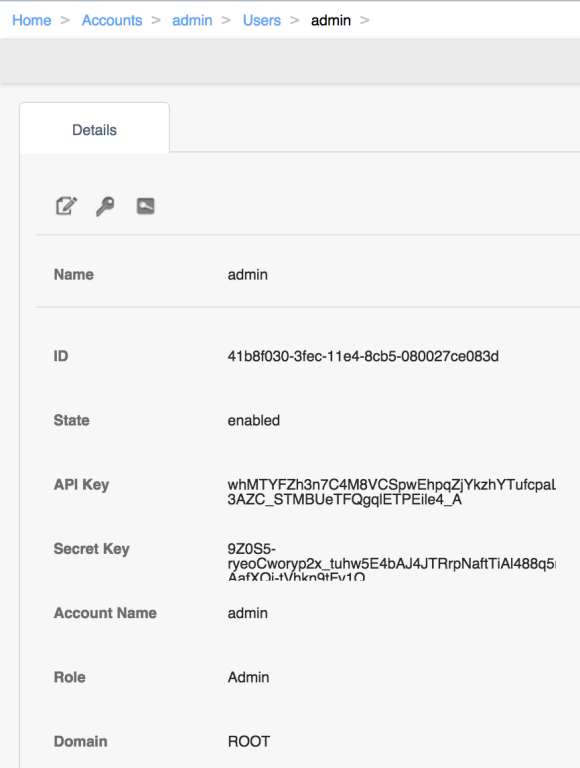
Before CloudMonkey will do anything useful, you need to point it to a CloudStack API endpoint. I’m using my DevCloud environment here. The API keys can be generated in the UI:

Copy the API keys from the CloudStack UI

Copy the API keys from the CloudStack UI

If no keys are displayed, click the icon on the right to generate keys. Then setup CloudMonkey:

set apikey whMTYFZh3n7C4M8VCSpwEhpqZjYkzhYTufcpaLPH9hInYGTx4fOnrJ3dgL-3AZC_STMBUeTFQgqlETPEile4_A
set secretkey 9Z0S5-ryeoCworyp2x_tuhw5E4bAJ4JTRrpNaftTiAl488q5rvUt8_pG7LxAeg3m_VY-AafXQj-tVhkn9tFv1Q
set url http://127.0.0.1:8080/client/api

Make sure to copy your own keys, as the ones here will only work on my local test CloudStack environment.

Finally, test the connection by syncing the API’s. Run this inside CloudMonkey:

sync

CloudMonkey responds:

466 APIs discovered and cached

Depending on your permissions (root, admin, user) and version of CloudStack, you’ll see more or less APIs being discovered.

A cool new (experimental) feature is tab completion, aka paramcompletion. Enable it like (run inside CloudMonkey):

set paramcompletion true

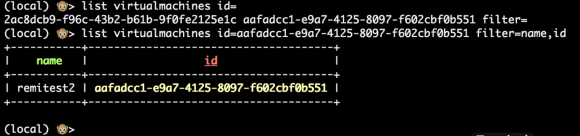
You’ll then be able to use the TAB key to auto-complete the UUIDs. Let me show you with an example:

CloudMonkey auto-complete feature in action (called paramcomplete)

CloudMonkey auto-complete feature in action (called paramcomplete)

I typed:

li<tab> vi<tab>m<tab> id<tab><tab>aa<tab><enter>

This auto-completes to the line you see in the image, and it displays the result as well.

Conclusion

CloudMonkey is a great tool to query the CloudStack infrastructure. Setting it up is not hard as we’ve seen. Justplay with it, and you’ll discover a great number of features. If you find bugs, be sure to contact Rohid Yadav, the author of CloudMonkey. The documentation can be found here.

Have fun with CloudMonkey!

Watch my talk “Start using Configuration Management in 5 steps”, at the CloudStack Collaboration Conference, Denver, Co, USA (April 9-11 2014).

Here are the slides from my presentation at the CloudStack Collaboration Conference in Denver: