


I’ve had some trouble when using the Mac OSX Terminal app for some time now. Until today, it just gave me some annoying warnings from time to time. Like when installing an application with apt-get in Debian:
perl: warning: Setting locale failed.
perl: warning: Please check that your locale settings:
LANGUAGE = (unset),
LC_ALL = (unset),
LC_CTYPE = “UTF-8”,
LANG = “en_US.UTF-8”
are supported and installed on your system.
perl: warning: Falling back to the standard locale (“C”).
locale: Cannot set LC_CTYPE to default locale: No such file or directory
locale: Cannot set LC_ALL to default locale: No such file or directory
It did work, so nothing too serious. I’ve also found applications, like iotop for example, that refuses to start when LC_ALL was unset. But a quick
EXPORT LC_ALL=$LANG
made the application start, so I didn’t take the time to investigate it further. Today I run into a more serious issue that cost me quite some time to figure out.
I had stopped the pure-ftpd deamon to do some maintenance and then started it again. It did start without error, but connecting failed:
server:~# ftp ftp.server.nl
Connected to ftp.server.nl.
perl: warning: Setting locale failed.
ftp>
Nothing had changed in the ftp configuration. After some debugging and trial & error, I found out that when I started the deamon from within a shell on Ubuntu it worked, but when I started it within a shell on my MacBook, it didn’t.
When looking at the locales I found:
server:~# locale
locale: Cannot set LC_CTYPE to default locale: No such file or directory
locale: Cannot set LC_ALL to default locale: No such file or directory
LANG=en_US.UTF-8
LC_CTYPE=UTF-8
LC_NUMERIC=”en_US.UTF-8″
LC_TIME=”en_US.UTF-8″
LC_COLLATE=”en_US.UTF-8″
LC_MONETARY=”en_US.UTF-8″
LC_MESSAGES=”en_US.UTF-8″
LC_PAPER=”en_US.UTF-8″
LC_NAME=”en_US.UTF-8″
LC_ADDRESS=”en_US.UTF-8″
LC_TELEPHONE=”en_US.UTF-8″
LC_MEASUREMENT=”en_US.UTF-8″
LC_IDENTIFICATION=”en_US.UTF-8″
LC_ALL=
Notice the two errors at the top. I talked to a colleague about this and he suggested looking at the Terminal app settings. There I found a setting called “Set locale environment variables on startup” which was activated. The setting is located in Preferences | Settings | Advanced. I’ve unchecked the button now as you can see in this screenshot:
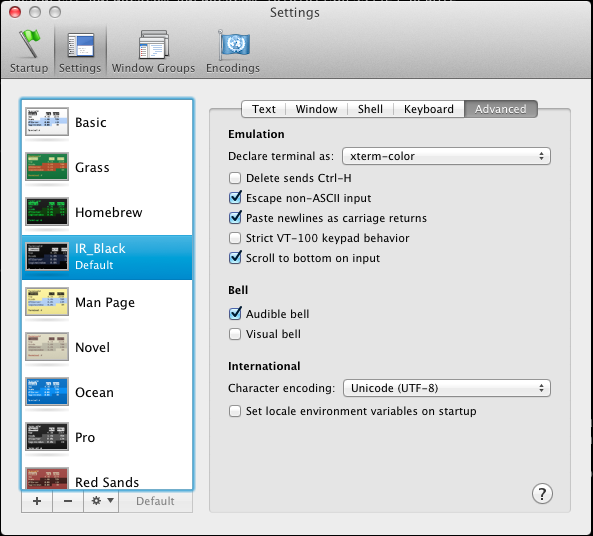
When closing the Terminal app, and reopening it again, I tried again:
server:~# locale
LANG=en_US.UTF-8
LC_CTYPE=”en_US.UTF-8″
LC_NUMERIC=”en_US.UTF-8″
LC_TIME=”en_US.UTF-8″
LC_COLLATE=”en_US.UTF-8″
LC_MONETARY=”en_US.UTF-8″
LC_MESSAGES=”en_US.UTF-8″
LC_PAPER=”en_US.UTF-8″
LC_NAME=”en_US.UTF-8″
LC_ADDRESS=”en_US.UTF-8″
LC_TELEPHONE=”en_US.UTF-8″
LC_MEASUREMENT=”en_US.UTF-8″
LC_IDENTIFICATION=”en_US.UTF-8″
LC_ALL=
No more errors! I tried restarting the pure-ftpd deamon from my Terminal app and it now works as expected. Even the warnings and errors when installing applications in Debian (apt-get) are gone. In fact, it seems this is the way it is supposed to work.
Glad I’ve fixed this 🙂
Update: As Reza mentions in the comments, it’s also possible to fix this problem on the server side. This is the best way to go if you want to fix this for your users. Thanks Reza!




 Remi Bergsma's blog
Thank you (“,)
You’re welcome! 🙂
Thanks!
I’m glad it helped you as well! Thanks for stopping by and letting me know.
Helped me too!
Great!
And thank you for making me smile 🙂
When encountering similar problems in the past, I used to disable in the SSH server the setting of accepting passed locale information.
I found it a more robust approach when users with different locales could connect to the same server.
Anyway thanks for publishing this, useful. 🙂
As a sys admin that would be the way to go to solve problems for your users, indeed. If you happen to remember the exact setting, let me know and I’ll document it here. Otherwise I’ll google it myself later on.
As a user (without access to SSH-server settings) the approach of changing a local setting is better. A lot of people seem to run into this problem these days so hopefully either one solution helps them out. Thanks for sharing!
Good point, one solution is client side and the other server side, what applies best depends on the situation.
About the SSH server config, standard sshd_config files found in most distros and OSX carry something like the following:
# pass locale information
AcceptEnv LANG LC_*
So to make sure the locale related env variables do not get forwarded it’s enough to just comment out the AcceptEnv directive above.
Cheers!
I’ve had this issue for awhile and only realized now that I can do it within Terminal Preference…
Anyways Centos sshd_config file is located: /etc/ssh/sshd_config
and you can comment out the line as mentioned by Reza below.
Good Article.
Thank you, I appreciate it 🙂
BR,
Jeans
You’re welcome!
That was VERY useful. Thank you so much!
Great it helped you!
Thanks!
Glad to hear this helps so many people 🙂
After trying many online suggestions to fix this problem, I ended up adding the following to my ~/.bashrc:
export LC_ALL=en_US.UTF-8
which fixed unset locale variables, while leaving the ‘set locales at startup’ checked.
This eliminated the warnings, since there is now a sensible LC_ALL fallback. I’m also still able to vary locale settings for terminal (+ remote) sessions.
For multi-language users, terminal presets can be made to e.g.: login as tr_TR.UTF-8.
I have the feeling that many users with this issue have subtle differences in the exact cause. Maybe due to updates of the locale system, updates of the remote system and even fiddling with the Mac OS X Terminal settings.
Anyway, glad to have finaly fixed this for my environment!
Thx to all contributers 😉
Grtz,
Samy
Thanks for sharing how you fixed it! The down side of your fix is that you need to change it on every server you connect to. In big environments this might not be the easiest way, and so fixing it in the client is easier.
Anyway, this post became a nice collection of different ways to solve it 🙂
Oh, to clarify, I did this in the .bashrc for the local Mac OS X user. Not on the server 😉
Oh nice! 🙂
Thank you very much!
You’re welcome!
It works, thanks! Also using the iTerm app, with a similar option.
Great it works for you too!
Reblogueó esto en Carlos Spitzery comentado:
Nice post!
Uff i finally had my Vagrant ssh doesnt show the warning everytime i login to my VM…on my Mac after I unchecked that checkbox…thanks 🙂
Finally. An article that explained it accurately. Every other article made it seem to be a server side issue. It was a client/server issue. I changed my locale iterm from ascii to UTF-8, all fixed. Not to mention now all UTF-8 characters show up.
You’re welcome 🙂
Yeay!!
🙂
worked great – thank you!
thank you everyone!
you saved my nerves from cracking!
🙂
This was a great tip, especially Riza’s way… TY.
Nice! Thanks for letting us know 🙂
Thank you
you’re welcome!
Big big big thx :p I was getting that with almost every git command in terminal.
You’re welcome, cool it made thing better for you 🙂
THX!!! it was so annoying. small things can make big differences 🙂
Gad it helped you too 🙂
thanks that solved it
Ah this was so annoying, thanks. Other websites simply just said:
Add these two lines to .bash_profile
export LC_CTYPE=en_US.UTF-8
export LC_ALL=en_US.UTF-8
Your solution is the one that worked.
Thanks so much!
Thanks so much!
$ vi .bash_profile
export LC_CTYPE=en_US.UTF-8
export LC_ALL=en_US.UTF-8
. ./.bash_profile
voila
Thank you! 🙂
excellent…fixed my problem with inserting accents into shell or psql cmds. Thanks much for sharing this!!
Thanks !
Eventually I found the right solution !
Thank you
juliusB
Locale identifiers are highly platform and system dependent and therefore there is no general solution to this problem. The solution that fits best can be found by reading and understanding the error messages. In the original case, Perl complained about unsupported locale settings. But it tells you that LC_ALL and LANGUAGE are unset which is perfectly okay. Likewise, LANG is set to “en_US.UTF-8″ which is also okay on a wide variety of systems. But LC_CTYPE is set to “UTF-8″ and this is wrong on most systems (with one notable exception: Mac OS X).
Obviously the Mac OS X terminal application sets LC_CTYPE to just a character set name and not to a locale identifier. This seems to work fine on Mac OS X but not on most other operating systems.
You can indeed avoid the problem by unchecking the “Set locale environment variables on startup” but that will leave you with all locale variables set to “C” aka “POSIX”. These locales are guaranteed to (basically!) work for all systems but you will often run into character conversion problems if you use non-UTF-8 locales.
The correct solution is therefore to override at least the faulty LC_CTYPE setting in your shell startup file (for example “~/.bash_profile”):
LC_CTYPE=en_US.UTF-8
export LC_CTYPE
You can, of course, pick other languages. And you can set other locale environment variables (LANG, LANGUAGE, LC_TIME, …) in the same manner. Just check the set of supported locales with “locale -a”. The locale identifiiers used by Mac OS X are compatible with BSD and glibc systems. Try “man locale” for more information or google for “ABOUT-NLS”.
If your Mac OS X locale settings are not supported on a remote system, you can edit your shell startup file there in order to set your locale to something locally supported.
Configuring the remote sshd to nuke the user locale settings looks like a rather brute and ugly solution to me.
Thanks.
Note 1: This comment is not directly related to ONLY Terminal and encoding, but also encoding on different GUI on MacOS.
On my MacBook (MacOS 10.10.3.) I use 3 language US, PL (Polish – Pro), UA (Ukrainian – PC). Now I do my research regarding encoding (potential issue).
Note 2:
Time ago, when I just bought MacBook, I tried to recreated standard Input Source “Ukrainian” into my variant by software Ukelele. It was working fine, but then I realized I have encoding issue with MyHeritage FamilyTreeBuilder. And to fix it, I just switched to normal “Ukrainian PC” input source, and everything was visually works fine.
This note is to inform you what I was doing time ago related to Languages/Encoding.
But recently, I exported GEDCOM file (simple text file with specific coding syntax) and inside of it there is mention of encoding utf-8, but GEDMATCH.COM after importing the file, shows my informattion in very wrong encoding. Potentially it’s gedmatch.com problem (I keep in touch with their support).
Anyway, I started worrying about my UTF-8-like MacOS input source and googled for command “locale”. In terminal I have “Set locale environment variables on startup” checked. Command locale gives me this:
So, @Remi_Bergsma I googled your blog entry, and here is the question:
Should I worry that I have many “C”? Should I manually via .bash_profile file set explicitly UTF-8 to avoid possible character changing issues as mentioned by @Guido_Flohr?
In iterm2, go to: Profiles -> Terminal and uncheck: “Set locale variables automatically”.
Restart iterm afterwards.
Had this problem trying importing matplotlib in python. It works now. Thanks a lot
A couple of years later, and this is till very useful. Thanks!
You saved my life! i had a problem importing py seaborn library. I had tried with conda, pip and no luck, in both 3.5 and 2.7. when i came across your post, and i deselected the tick now works like a charm.
Many thanks!
Still works, thank you very much!
Thank you very much, I was driving crazy with that
Very useful, Thank you
Thank you sooo much! It’s just 7:30am, but you made my day!
Thank you sooo much! It’s just 7:30am but you made my day!
Perfect to me. Clap.
yes, it’s 2019 – and this article saved me today! many thanks
Great tutorial and it works like a charm. Keep up the good work! 🙂
I just bought a new MacBook Pro. I set all definitions to work on the remote server (where I was working before with my 10yo MacBook Pro). But when I logged in for the first time I got the following error:
-bash: warning: setlocale: LC_CTYPE: cannot change locale (UTF-8): No such file or directory
2020 and this post saved me. It works like a charm.
Thanks.
thank you so much =)
Thanks a lot. Was bothered by this for past few days.