Archives For 30 November 2011

Since I’m working with CloudStack I’m also working with CentOS. As I’ve been working with Debian for over 10 years, it sometimes takes some extra time to get things done. Like when you want to install a package that is not in the default repo’s.

This is how to enable the RPMForge repository:

Start to import the key:

rpm --import http://apt.sw.be/RPM-GPG-KEY.dag.txt

Then download the RPMForge release file:

wget http://apt.sw.be/redhat/el6/en/x86_64/rpmforge/RPMS/rpmforge-release-0.5.2-2.el6.rf.x86_64.rpm

Then all you need to do is install this rpm:

rpm -i rpmforge-release-0.5.2-2.el6.rf.x86_64.rpm

You only need to do this once. Now the packages from RPMForge can be installed using yum. Have fun!


The PHP Extension Community Library (PECL) has many great extensions for php5. Unfortunately, most are not packaged for Debian. Of course it is pretty easy to install it by hand. For example the ‘pecl_http’ extension:

pecl install pecl_http
echo "extension=http.so" > /etc/php5/conf.d/http.ini

For this to work you need some -dev packages to be installed. php5-dev and build-essential are the minimum required.

I have two problems with this method:
1. Too many -dev packages will be installed on production servers. I want to have as less packages installed as possible;
2. The software is not easily installable and upgradable;

I’ve yet another requirement: I need to distribute my package in a local Debian repository so it can be automatically installed. Therefore I need to have the right metadata with my new package. The method I describe here does create all files you need to upload the package to a Debian Repository.

Start to create an empty directory for our new package:

mkdir php-pecl-http_1.7.4-1

Then go into this new directory and download the PECL package you want to package for Debian.

pecl download pecl_http

Using ‘dh-make-pecl’ you can create a Debian source package like this:

dh-make-pecl --only 5 pecl_http-1.7.4.tgz

The next step is fixing a problem with ‘pecl_http’. The generated .so file is called http.so and not pecl_http.so. You can skip this step when creating other packages.

sed -i 's/PECL_PKG_NAME=pecl-http/PECL_PKG_NAME=http/1' debian/rules
mv debian/pecl-http.ini debian/http.ini
sed -i 's/pecl-http.so/http.so/1' debian/http.ini

If you want, you can edit the changelog. For example when you want to customize the version number.

vim debian/changelog

Now it’s time to build the package. Look closely to the output when you get an error. You might need some dependencies like php5-dev and build-essential.

Don’t run this as root, but add ‘-rfakeroot’ as oridinary user.

dpkg-buildpackage -rfakeroot

You will find your new package one level below:

ls -la ../

drwxr-xr-x 3 remi staff   4096 Apr  5 16:58 .
drwxr-xr-x 7 remi staff   4096 Apr  5 18:23 ..
-rw-r--r-- 1 remi staff   1134 Apr  5 16:08 channel.xml
-rw-r--r-- 1 remi staff 174503 Apr  5 16:08 pecl_http-1.7.4.tgz
-rw-r--r-- 1 remi staff 146352 Apr  5 16:38 php5-pecl-http_1.7.4-1_amd64.deb
drwxr-xr-x 5 remi staff   4096 Apr  5 16:56 php-pecl-http-1.7.4
-rw-r--r-- 1 remi staff   1516 Apr  5 16:38 php-pecl-http_1.7.4-1_amd64.changes
-rw-r--r-- 1 remi staff   4334 Apr  5 16:58 php-pecl-http_1.7.4-1.diff.gz
-rw-r--r-- 1 remi staff    769 Apr  5 16:38 php-pecl-http_1.7.4-1.dsc
-rw-r--r-- 1 remi staff   4332 Apr  5 16:57 php-pecl-http_1.7.4-1.md.0.diff.gz
lrwxrwxrwx 1 remi staff     19 Apr  5 16:09 php-pecl-http_1.7.4.orig.tar.gz -> pecl_http-1.7.4.tgz

The *.deb *.changes *.diff.gz *.dsc and *.orig.tar.gz files are needed for uploading to a repository. I’m not covering setting up your own Debian Repository. Don’t worry, you can always install the .deb directly like this:

dpkg -i php5-pecl-http_1.7.4-1_amd64.deb

To install from your Debian Repository:

apt-get update
apt-get install php5-pecl-http

In my configuration management (Puppet) I can now ensure this package is installed at all times at all nodes that run php5. Furthermore, I can compile and package on a dedicated compile vm and have as clean as possible production vm’s!

Lately I’ve been coding to automate the deployment of Virtual Machines that will run in our cloud. It’s inspired by blogs and code from Jason Hancock but implemented in a different way to meet our specific needs. Since CloudStack has a very flexible API, you can make it do anything you want. It works pretty cool so far.

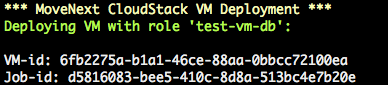
From a command line script we can deploy a new VM with a certain “role”. This role has a name, like “web server” or “test-vm-db” and contains the OS template name, the datacenter name, the networks to connect to, the hardware offering (CPU/Memory/Disk) and the account and domain to use. These are all CloudStack specific settings. When calling the deployVirtualMachine() API command, CloudStack will create a VM with exactly these specs. We use a simple php cli script to add a new server, like this:

Result:

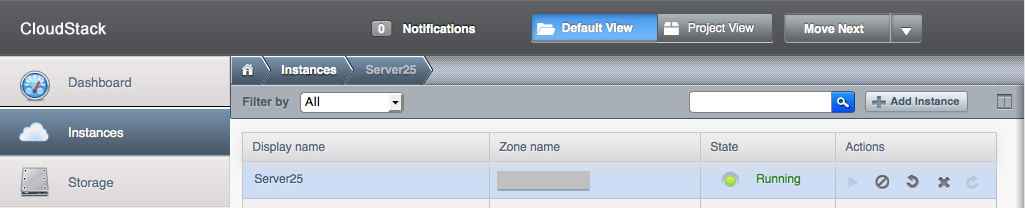
Since it is in a specific domain (defined by the role), other users in that domain can “see” and work with the new VM immediately. When you deploy for a client, they will “see” the new VM like this:

When the VM boots, it is receives its role name, “web server” for example, and sends this info to Puppet. This way, Puppet knows how to configure the new VM. It will do so and when it’s finished you have an exact same “web server” as the others. Run the script again and you’ll have another one. Puppet does not only do initial configuration, it will make sure the configuration stays consistent across the all servers it manages. When you want to change a setting, Puppet distributes it and makes sure it’s the same on all servers. All automatically!

Imagine the power behind this concept. All of a sudden you can create a script that can deploy a new web server in just minutes. Now even the loadbalancer itself can spin up a new web server to handle the higher load it receives. Or destroy a web server when there are too many idle web servers. That’s what you call elastic!

What you need to build this yourself is:
1. PHP CloudStack Client (to talk to CloudStack from PHP)
2. CloudStack API docs
3. Script to grab meta-data when VM has booted

Please see Jason Hancock‘s blog for some working examples of how he implemented it. As I said, CloudStack’s API is very flexible. But you can even extend the API, if you want to go further. Thanks for the inspiration Jason!

Today while I was running I realized I’ve been doing a lot of coding lately. Coding our new infrastructure to be exact. I remembered Kris Buytaert’s talk about DevOps back in February when I was in Antwerp. One of the key statements is that there are ‘sysadmin coders’ and not ‘sysadmins’ and ‘coders’. The only way to achieve great results, is when these two work together and communicate with each other. The idea’s behind this are called DevOps. IT Operations starts using code to manage configurations and infrastructure instead of doing it by hand over and over again. Thanks to CloudStack and Puppet this is now possible. Ideally, you would not have two groups, but one. Stephen Nelson-Smith from jedi.be describes it like this:

So, the Devops movement is characterized by people with a multidisciplinary skill set – people who are comfortable with infrastructure and configuration, but also happy to roll up their sleeves, write tests, debug, and ship features. These are people who making connections, because they can – because they have feet in multiple camps, they can be ambassadors, peace makers, facilitators and communicators. And the point of the movement is to identify these, currently rare, people and encourage them, compare ideas, and start to identify, train, recruit and popularize this way of doing IT.

More on Stephen’s blog..

I didn’t realize back then what this would mean because I was focused on CloudStack and the tools around it. But it is not only about the tools, it’s the way you look at managing infrastructure and development. What we’re doing looks like DevOps but we’re not there yet ;-). In the coming weeks I’ll spend some more time reading about DevOps to see how we can implement this in our organization. Because I really believe this is the way to go..

Remote Linux systems usually have to be available all the time. Although Linux is rock solid and stable, an occasional crash can occur. For example when there’s a problem with hardware or software. The last thing you want, is that a Linux server got a kernel panic and then waits forever for someone to reboot it.

Of course there’s monitoring, and there are APC’s too, which can reboot the server. This is like pulling the plug. It usually takes some time for monitoring to notify a sysadmin and then for the sysadmin to reboot the server. And, when using IPMI devices (especially the older ones that share a network connection with the server), a kernel panic could make them unavailable, too. I’ve had that on many occasions. Then you end up driving to the data center or call someone to reset the server. I hate that 😉

In our setup, most servers are in clusters. This means losing one server should not be a problem. But you still want a server to be available again as soon as possible, to be able to handle future problems.

There’s a way to configure Linux to reboot automatically, say 10, seconds after a kernel panic occurs. This will quickly and automatically have the server up again. Should rebooting not help, then bad luck and there’s probably some failing hardware part. You’ve then to drive to the data center anyway.

So, how to do that? Well, there are several options to set this parameter. To test this out, use this command:

/sbin/sysctl -w kernel.panic=10

Note that this setting will not survive a reboot. If you want it to remain active, add this line to /etc/sysctl.conf:

kernel.panic=10

To check the current setting, issue:

cat /proc/sys/kernel/panic

It is wise to implement some sort of monitoring on reboots or uptime. You definitely want to read the logfiles and find out what exactly happened that led to the kernel panic.